Everything You Need to Know About Google’s New Googlebook gemini intelligence laptops
Discover everything about the Googlebook — Google’s new Gemini Intelligence laptops replacing Chromebooks. Explore features, specs, Magic Pointer, Android integration, and how Googlebook stacks up against Windows and macOS AI PCs.
Introduction: The Dawn of a New Era in Personal Computing
The laptop landscape has just been shaken to its core. On May 12, 2026, Google officially pulled back the curtain on the Googlebook — a brand-new category of AI-powered laptops built from the ground up around Gemini Intelligence, Google’s most advanced family of AI models. This is not a spec bump or a software update. This is a fundamental rethinking of what a personal computer can be.
For over 15 years, Chromebooks have served as Google’s answer to the personal laptop — affordable, browser-centric, and popular in schools and budget markets. But the computing world has changed dramatically. Artificial intelligence is no longer a feature you bolt onto a device; it is the operating philosophy of the device itself. With Googlebook, Google is betting that the future of the laptop is not just cloud-connected but AI-native, proactive, and deeply personal.
The question on every tech enthusiast’s mind right now is simple: What exactly is a Googlebook, and is it the laptop of the future?
In this comprehensive deep-dive, we will answer every question — from what Googlebook actually runs under the hood, to its groundbreaking features, its hardware partners, how it compares to Chromebooks and Windows AI PCs, and what this launch means for the future of personal computing.
What Is the Googlebook? A New Laptop Category Defined
At its heart, the Googlebook is Google’s most ambitious reimagining of the personal laptop since the original Chromebook launched in 2011. While Chromebooks were built around the Chrome browser and the idea that the web is all you need, the Googlebook is built around a radically different premise: that AI — specifically Gemini — should be the invisible operating layer running through every interaction you have with your laptop.
Google describes the Googlebook as the first laptop “designed from the ground up for Gemini Intelligence.” Rather than treating AI as a sidebar tool or a chat window you open when you need help, Gemini on Googlebook is woven into the very fabric of the operating system. It watches what you’re doing, understands context, and proactively offers assistance before you even think to ask.
The company’s senior director of laptops and tablets, Alex Kuscher, has described this as making computers genuinely helpful at the operating system level — not just in specific apps. This is a profound philosophical shift. Previous AI integrations, whether Google’s own earlier Gemini features on ChromeOS or Microsoft’s Copilot on Windows 11, have largely treated AI as a supplementary layer. On Googlebook, AI is the foundation.
The Operating System: Android Meets Chrome in a Gemini-First World
One of the most significant technical revelations about Googlebook is what powers it under the hood. Rather than continuing with ChromeOS, Google has built the Googlebook platform on Android — the same operating system that runs on billions of smartphones worldwide.
This was not a sudden decision. For years, industry observers had tracked Google’s gradual moves toward unifying Android and ChromeOS. Android boss Sameer Samat had publicly stated that the Android codebase would form the core of this new platform, and the Googlebook is the fulfillment of that long-gestating vision.
Why Android Instead of ChromeOS?
The move to Android opens up a dramatically richer software ecosystem. Chromebooks, for all their strengths, were perpetually criticized for their limited app library. While they gained access to the Google Play Store over the years and even supported Android app streaming from phones, the experience was often described as awkward — a phone app trying to live in a laptop-sized box.
With Googlebook, Android is the native operating system. That means the entire Google Play Store catalogue — millions of applications — runs natively on these laptops. Users get the apps they already know and love from their phones, but on a full-sized laptop screen, designed to work well with a keyboard, trackpad, and larger display.
As one tech analyst put it: if ChromeOS was like a car limited to one highway, Android opens up an entire road network. You go where you want, when you want, with whatever apps you need.
The new Googlebook platform also weaves together the Chrome browser seamlessly with Android apps, offering what Google calls “the best of Chrome and Android.” Users get powerful, full-featured web browsing alongside the rich Android app ecosystem — all unified under Gemini’s watchful, helpful intelligence.
Gemini Intelligence: The Brain Behind Every Googlebook
The defining characteristic of every Googlebook is Gemini Intelligence — Google’s flagship family of AI models — operating as a system-wide assistant rather than a standalone feature. This is where Googlebook most dramatically separates itself from every other laptop on the market today.
Magic Pointer: Reimagining the Computer Cursor
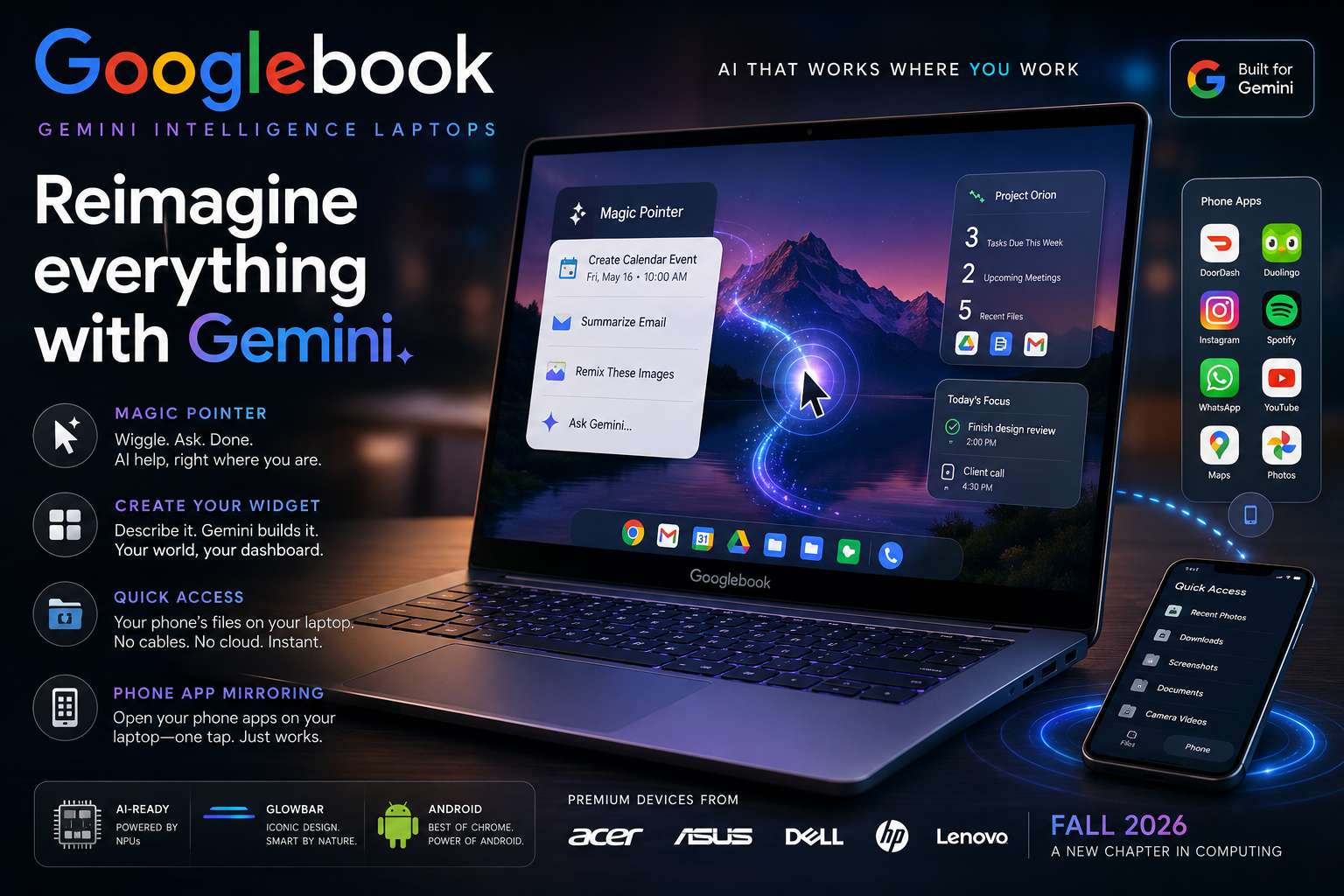
Perhaps the most talked-about feature of the Googlebook is the Magic Pointer — an AI-powered reimagining of the humble computer cursor, developed in collaboration with Google DeepMind.
The concept sounds deceptively simple: wiggle your cursor, and Gemini activates to offer contextual suggestions based on whatever is on your screen at that moment. But the implications are profound.
Here are just a few examples of what Magic Pointer can do:
- Email to Calendar in one gesture: Point your cursor at a date mentioned in an email, wiggle, and Magic Pointer instantly offers to create a calendar event for that date — no copying, no switching apps, no manual entry required.
- Visual ideation on the fly: Select two different images — say, two advertising designs in a Dropbox folder — wiggle the Magic Pointer, and ask Gemini to combine or remix them into a new visual concept. Creative work that previously required design software and significant time now takes seconds.
- Contextual task actions everywhere: Whether you’re browsing a website, reading a document, working in a spreadsheet, or watching a video, Magic Pointer can surface relevant actions from Gemini based on what it sees on screen.
Google executive Alexander Kuscher described the design goal as making the cursor “truly smart and intelligent” — transforming the pointer from a passive navigation tool into an active, aware AI collaborator.
This is a bold move that speaks to just how deeply AI is integrated into the Googlebook experience. Other AI laptops — including Microsoft’s Copilot+ PCs — have added AI features, but they typically live in specific apps or require dedicated button presses to activate. Magic Pointer makes AI ambient and always available through the most natural interaction pattern on a laptop: moving the mouse.
Create Your Widget: A Personalized AI Dashboard
Another headline Gemini feature on Googlebook is Create Your Widget — a tool that lets users build completely custom, personalized dashboard widgets by simply typing a prompt to Gemini.
Want a widget that shows your week’s meal prep recipes pulled from your saved links, Gmail, and Google Drive? Just ask. Want a project dashboard that aggregates your upcoming deadlines from Google Calendar, recent files from Drive, and relevant emails from Gmail all in one place? Describe it to Gemini, and it builds it for you in seconds.
This feature is also coming to Android 17 and Wear OS, reflecting Google’s broader strategy of deploying Gemini Intelligence across its entire ecosystem. But on Googlebook, Create Your Widget is a central part of the home screen experience — a way to make your laptop feel genuinely tailored to your life and work.
Android Phone Integration: Your Laptop and Phone as One
One of the most practical and compelling aspects of Googlebook is how deeply it integrates with your Android smartphone. Google is positioning Googlebook as a device that doesn’t just exist alongside your phone — it extends your phone onto your laptop screen.
Quick Access: Your Phone’s Files, Right on Your Laptop
A new feature called Quick Access puts your Android phone’s files directly inside your Googlebook’s file browser. No USB cables. No uploading to Google Drive and downloading again. Simply open the file browser on your Googlebook, and your phone’s files appear in a sidebar, instantly accessible. You can view them, search through them, and insert them directly into whatever you’re working on — all without ever picking up your phone.
This is a significant quality-of-life improvement over what Chromebook offered. On ChromeOS, getting a file from your Android phone to your laptop required either a USB connection or routing through Google Drive — an inconvenient extra step that most users found frustrating. Quick Access eliminates that friction entirely.
Phone App Mirroring: Run Your Phone Apps Without Downloading
Googlebook also introduces seamless Android phone app mirroring — the ability to launch and use apps from your phone directly on your laptop, without downloading anything to the laptop itself.
Google’s blog post paints a vivid picture of this in action: you’re deep in a work task on your Googlebook when hunger strikes. Rather than picking up your phone, unlocking it, and losing your work focus, you simply tap the phone button in the dock at the bottom of your Googlebook screen. A grid of your phone’s apps appears instantly. You open your food delivery app, place an order, and return to your work — all without leaving the laptop environment.
Or imagine you receive a reminder for your daily language learning lesson on Duolingo. You pop over, complete the lesson on the laptop, and return to your work — no downloading, no awkward touchscreen controls emulated on a large screen. Google promises it “just works.”
This is a capability that echoes Apple’s iPhone Mirroring feature introduced on Macs, and it represents a meaningful step toward the seamless device ecosystem that users of both platforms have long desired.
Hardware: Premium Materials, Iconic Glowbar, and Top-Tier Partners
While Google has not yet released full hardware specifications for Googlebook devices — those are expected to be revealed at Google I/O 2026, which kicks off in the coming days — several important details about the physical hardware are already known.
The Glowbar: A New Design Signature
Every Googlebook will be identifiable by a distinctive physical feature: the glowbar. Described by Google as both “functional and beautiful,” this illuminated bar on the lid of the laptop is a direct nod to the iconic Chromebook Pixel that Google released back in 2013, where a glowing bar on the lid would show the device’s remaining battery life.
What exactly the 2026 glowbar will do in functional terms has not yet been fully disclosed, but it signals Google’s intention to give Googlebook a distinctive, premium hardware identity that sets it apart from the sea of generic laptop designs.
Premium Focus, Not Budget Positioning
One of the most notable departures from the Chromebook tradition is Googlebook’s premium positioning. Chromebooks became famous (and sometimes infamous) for their affordability — great for schools, great for casual users, not so great for power users or professionals who wanted high-end hardware.
Googlebook is a deliberate pivot upmarket. Google VP John Maletis, a lead on ChromeOS for roughly a decade, has described early partner hardware as “super premium” with “beautiful devices, incredible hardware.” This signals that Google is going after the premium consumer laptop segment — competing directly with high-end Windows AI PCs and, by implication, Apple’s MacBook lineup.
Industry analysts anticipate that first Googlebook models will feature AI-focused processors with dedicated Neural Processing Units (NPUs), high-refresh-rate displays, long battery life, and deep cloud integration — specifications that would position them squarely against premium Windows AI PCs and Apple Silicon MacBooks.
Manufacturing Partners: The Who’s Who of Laptop Makers
Google will not be building Googlebooks alone. The company has announced partnerships with five of the world’s most respected laptop manufacturers: Acer, Asus, Dell, HP, and Lenovo. All five are familiar names from Google’s Chromebook program, so they bring years of experience building to Google’s platform specifications.
On the processor side, confirmed chipset partners include Qualcomm (with its Snapdragon X series of Apple-competitive desktop chips), MediaTek, and Intel — confirming that Googlebooks will support both ARM and x86 architectures. This broad silicon support means manufacturers can build Googlebooks across a range of performance tiers while staying within the platform’s ecosystem.
Notably absent from the initial launch partner list is Samsung, which has its own Android-powered Galaxy Book line. Google VP Maletis confirmed that the listed partners represent only those hitting the initial Fall 2026 launch window — Samsung and others may well join at a later stage.
What Happens to Chromebooks?
With Googlebook announced, the inevitable question looms: what happens to Chromebooks? Google has addressed this directly, and the answer is nuanced.
Chromebooks are not being immediately discontinued. Google has confirmed that all existing Chromebooks will continue to receive support through each device’s existing end-of-support commitment. The company stated clearly: “Chromebooks have become an invaluable tool for educational institutions, businesses, and consumers throughout the globe, bringing powerful features, security, and simple-to-use management tools for commercial users. We absolutely intend to continue investing in those experiences and supporting those users.”
However, Google has also confirmed that “many” existing Chromebooks will be eligible to transition to the new Googlebook software experience — essentially receiving an upgrade to the new Android-based platform when it launches. Exactly which Chromebook models will qualify for this upgrade will be announced closer to launch.
The long-term picture seems clear: ChromeOS as a platform is being gradually retired in favor of the new Android-based Googlebook platform. The Chromebook as a hardware category will persist for existing users and the education market for now, but the future of Google’s laptop ecosystem is unambiguously the Googlebook.
If you are currently considering buying a Chromebook, this announcement should give you pause. It is worth waiting to see what Googlebooks offer at launch — and at what price — before committing to a platform that is being phased out.
Googlebook vs. Windows AI PCs: The Battle for the AI Laptop Crown
The launch of Googlebook does not happen in a vacuum. Microsoft has been aggressively pushing AI into Windows with its Copilot+ PC initiative, which brought features like Recall (an AI-powered screen memory), Cocreator in Paint, and Live Captions to high-end Windows laptops. Intel, Qualcomm, and AMD have all released processors with increasingly powerful NPUs specifically for AI workloads.
So how does Googlebook stack up?
Integration depth: Google’s Magic Pointer may represent the deepest system-level AI integration we have seen on any laptop platform. While Copilot on Windows is powerful, it largely lives in a sidebar or specific Microsoft applications. Magic Pointer is omnipresent — available anywhere the cursor goes, which is everywhere.
Ecosystem coherence: For Android phone users — which means the majority of smartphone users worldwide — Googlebook offers an ecosystem coherence that Windows cannot match. Quick Access and phone app mirroring are experiences that will feel genuinely seamless to anyone already in the Android ecosystem, similar to how iPhone users feel in the Apple ecosystem with a MacBook.
App ecosystem: Android’s Google Play Store is the world’s largest app store, giving Googlebook access to an enormous catalogue of applications. Windows has a broader desktop software library, but for consumer use cases, the Android app ecosystem is increasingly comprehensive.
AI model quality: Gemini, particularly Gemini Ultra and Gemini Pro, are among the most capable AI models available. Having these models deeply integrated into the OS rather than bolted on as an afterthought gives Googlebook a meaningful intelligence advantage.
Target audience: Current indications suggest Google is targeting premium consumer users — creative professionals, students, everyday workers, and Android smartphone owners who want their devices to work together seamlessly. Microsoft’s Copilot+ push spans both consumer and enterprise markets. Google appears, at least initially, to be less focused on enterprise and IT-managed environments, where Chrome OS has historically had a strong foothold.
Googlebook vs. MacBook: Can Google Challenge Apple’s Premium Dominance?
The more provocative comparison is Googlebook versus the MacBook. Apple’s laptops — particularly those powered by Apple Silicon chips like the M4 and M4 Pro — represent the gold standard for premium consumer laptops. They offer extraordinary performance, outstanding battery life, a polished operating system, and an ecosystem that millions of loyal users consider irreplaceable.
Google has never seriously challenged Apple in the premium laptop market. Chromebooks were never designed to compete with MacBooks. But Googlebook, with its premium hardware positioning, AI-first design philosophy, and deep ecosystem integration, is clearly aiming at a similar audience.
A few considerations:
- For Android users: If you already have an Android phone, Googlebook’s seamless integration — Quick Access, phone app mirroring, shared Google account — creates an ecosystem experience that rivals what Apple offers iPhone and MacBook users. This is Google’s strongest argument.
- For existing Apple users: The appeal is less obvious. Switching away from a mature, polished macOS ecosystem with deep iPhone integration is a high bar. Googlebook will need to demonstrate not just parity but genuine superiority in key use cases.
- For students and new laptop buyers: This is perhaps Google’s biggest opportunity. A student buying their first premium laptop in Fall 2026 who already uses an Android phone and Google Workspace (Docs, Sheets, Slides, Gmail, Drive) could find Googlebook the most natural fit.
For a detailed look at how current AI-powered laptops compare, the Tom’s Guide Best Laptops roundup is an excellent external resource that tracks the latest recommendations across Windows, macOS, and ChromeOS platforms — and will likely include Googlebook coverage closer to launch.
Key Googlebook Features: A Complete Summary
Let’s consolidate everything we know about Googlebook features into one clear reference:
Magic Pointer An AI-powered cursor developed with Google DeepMind. Wiggling the cursor activates Gemini-powered contextual suggestions based on what is visible on screen. Enables one-gesture calendar event creation, visual ideation, and proactive task completion.
Create Your Widget A prompt-based widget creation tool. Users describe what they want to see on their home screen, and Gemini builds a custom, personalized dashboard widget by pulling information from Gmail, Calendar, Drive, and other Google apps.
Quick Access Gives users direct access to their Android phone’s files from inside the Googlebook’s file browser — no cables, no cloud transfer required.
Phone App Mirroring Launch and use Android phone apps directly on the Googlebook via a one-tap phone button in the dock. No downloading required, with native-feeling controls.
Android OS Foundation Full access to the Google Play Store and native Android app compatibility, moving beyond ChromeOS’s browser-centric limitations.
Chrome + Android Integration The Chrome browser and Android apps coexist natively, giving users the best of web and mobile software on a single platform.
Glowbar Design A signature illuminated bar on the lid of every Googlebook, providing a distinctive visual identity and rumored functional capabilities to be announced.
Premium Hardware Built in partnership with Acer, Asus, Dell, HP, and Lenovo, with premium materials, AI-optimized processors (NPUs), and high-end components targeting the premium consumer laptop segment.
Gemini Throughout System-wide Gemini Intelligence integration, with AI available proactively across the operating system rather than as a separate application.
Expected Price and Availability
Google has confirmed that the first Googlebook devices will launch in Fall 2026. Full hardware specifications, pricing, and exact launch dates are expected to be revealed at Google I/O 2026, which begins in Mountain View, California in the coming days.
What we know about pricing is that Googlebooks will be positioned as premium devices — a significant departure from the budget-friendly Chromebook pricing model. While entry-level Chromebooks have historically been available for as little as $249–$299, Googlebooks are expected to compete in the $799–$1,499+ range, based on the premium hardware emphasis and the comparison to Windows AI PCs and high-end MacBooks that Google itself is inviting.
This pricing shift reflects Google’s strategic ambition: Googlebook is not trying to win the budget market. It is going after quality-conscious consumers who want the most intelligent laptop experience available — and who are willing to pay for it.
The Bigger Picture: What Googlebook Means for the Future of Computing
The launch of Googlebook is not just a product announcement — it is a statement of philosophy about where personal computing is heading.
For over a decade, the dominant narrative in laptops has been incremental improvement: faster processors, better displays, thinner designs, longer battery life. AI changed that narrative entirely. Now, the competitive frontier is not hardware performance but intelligence — how well your device understands you, anticipates your needs, and acts on your behalf without friction.
Google’s Googlebook represents one bold answer to that challenge. By building an entirely new platform from the ground up around Gemini Intelligence, by merging Android and ChromeOS into something greater than either, and by reimagining even the most basic interactions (moving a cursor!) as opportunities for AI to help, Google is making a serious claim to leadership in the AI laptop era.
Whether Googlebook lives up to its promise will depend on execution. Google has a mixed track record with hardware ambitions — the company that made the brilliant Pixel phones also made the underwhelming Stadia gaming service. But the underlying technology is strong, the ecosystem fit for Android users is compelling, and the timing — as AI transforms every category of computing — could not be more right.
Frequently Asked Questions About Googlebook
What is a Googlebook? A Googlebook is Google’s new category of AI-first laptops, announced in May 2026, built on an Android-based operating system with Gemini Intelligence deeply integrated throughout the platform.
Will Googlebook replace Chromebook? Yes, in the long term. Existing Chromebooks will continue to be supported, and many will be eligible to upgrade to the Googlebook platform software. New premium devices will be Googlebooks rather than Chromebooks going forward.
What makes Googlebook different from other laptops? The deepest system-level AI integration available in a laptop today, including the Magic Pointer cursor, Create Your Widget, seamless Android phone integration via Quick Access and app mirroring, and native Android app support through Google Play.
When will Googlebooks be available to buy? Fall 2026, from manufacturers including Acer, Asus, Dell, HP, and Lenovo.
What operating system does Googlebook run? An Android-based operating system, separate from ChromeOS, designed specifically for the laptop form factor with Gemini Intelligence at its core.
Will Googlebook support Google Play apps? Yes. Because Googlebook is built on Android, it natively supports the entire Google Play Store ecosystem.
Does Googlebook work with iPhones? Specific iPhone integration details have not been confirmed. The deep phone integration features (Quick Access, phone app mirroring) are designed for Android phones.
What is the Magic Pointer on Googlebook? An AI-powered cursor developed with Google DeepMind. Wiggling the cursor activates Gemini to offer contextual suggestions and actions based on what is on your screen.
Conclusion: Is Googlebook the Laptop Revolution We’ve Been Waiting For?
The Googlebook is genuinely exciting. Not in the breathless, overhyped way that every tech product gets called revolutionary — but in the substantive sense that it represents a coherent, well-reasoned, and boldly executed vision for what the laptop should become in an AI-first world.
Magic Pointer alone is one of the most inventive new computer interaction paradigms in years. The Android-based platform, with full Google Play access and seamless phone integration, addresses real frustrations that Chromebook users have lived with for years. The premium hardware positioning signals that Google is serious about competing for users who previously had no reason to look at a Google laptop.
There are open questions, of course. Full pricing and hardware specs are not yet confirmed. We do not know how smoothly the Android-on-laptop experience will work in practice, or whether Googlebook’s AI features will hold up to the hype in daily use. Enterprise and education adoption — where Chromebooks made their most durable impact — is uncertain.
But here is what is clear: Google has stopped playing it safe with laptops. The Googlebook is not a Chromebook Plus. It is not an incremental update. It is a genuine rethinking of the personal computer, built for a world where intelligence is the most important feature a device can have.
Keep your eyes on Google I/O 2026 in the coming days — that is where Googlebook’s full story will begin to be told. The age of the AI laptop has arrived, and Google just made its most ambitious play to lead it.
Sources: Google Blog, TechCrunch, Engadget, 9to5Google, The Register, TechRadar, Trusted Reviews, Gizmochina
Last updated: May 13, 2026