Instagram Instants Feature: Complete Review & Guide (2026)
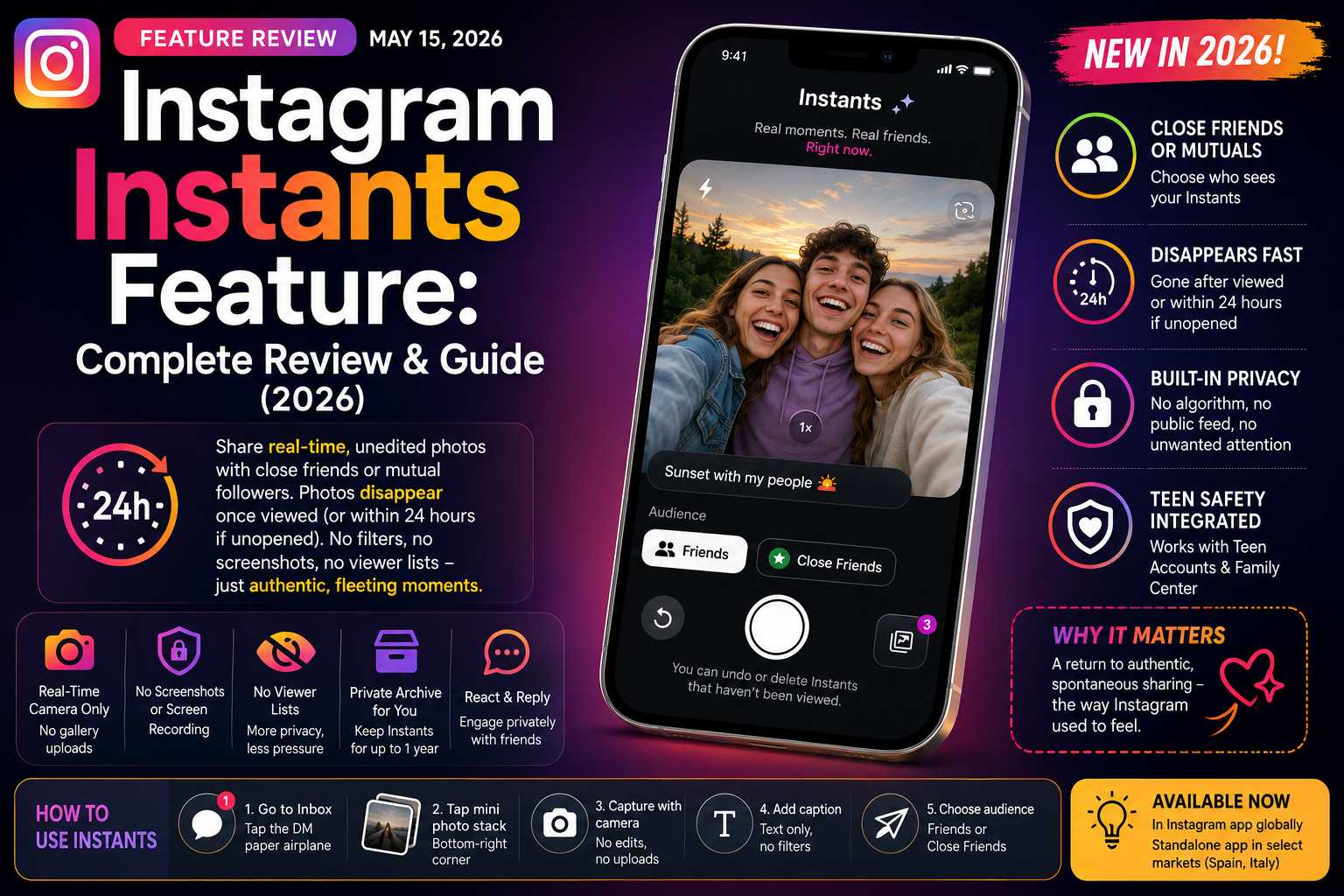
Quick Summary: The Instagram Instants Feature lets you share unedited, real-time photos with close friends or mutual followers. Photos disappear once viewed (or within 24 hours if unopened). No filters, no screenshots, no viewer lists — just authentic, fleeting moments.
Table of Contents
- What Is the Instagram Instants Feature?
- How the Instagram Instants Feature Works
- Step-by-Step: How to Use Instagram Instants Feature
- Privacy & Safety in the Instagram Instants Feature
- Instagram Instants Feature vs. Snapchat, BeReal & Stories
- Teen Safety Controls in the Instagram Instants Feature
- How to Turn Off the Instagram Instants Feature
- Full Review: Is the Instagram Instants Feature Worth Using?
- Final Verdict
Introduction
In May 2026, Meta launched what may be its most philosophically interesting product addition in years: the Instagram Instants Feature. At a time when nearly every major platform is racing to integrate artificial intelligence, add more algorithms, and engineer more engagement, Instagram went in precisely the opposite direction — with a feature designed to strip everything away.
No filters. No editing tools. No viewer lists. No algorithm. Just a photo, taken right now, sent immediately, gone the moment it is viewed.
In this comprehensive review and guide, we break down every single aspect of the Instagram Instants Feature: what it is, how it actually works, who it is designed for, how it compares to rivals, and whether it is genuinely worth your attention or merely a recycled idea dressed in new clothes.
1. What Is the Instagram Instants Feature?
At its core, the Instagram Instants Feature is a disappearing photo tool built directly into the Instagram inbox. According to TechCrunch, Meta announced its global launch on May 13, 2026, following a limited testing period with select users. The feature is designed specifically for sharing spontaneous, unfiltered moments — photos taken in real time, sent immediately, and deleted automatically once the recipient views them.
The concept draws clear inspiration from multiple platforms simultaneously. The feature borrows ideas from social platforms like Snapchat, Locket, and BeReal, as it focuses on authentic and ephemeral content. However, what makes the Instagram Instants Feature distinctive is how deeply it integrates into an existing platform with over two billion active users — rather than asking people to download yet another standalone app.
Meta’s stated philosophy behind Instants is a direct response to a problem the company helped create: Instagram gradually evolved from a casual photo-sharing app into a heavily commercialized content ecosystem. The feed is dominated by Reels, ads, and influencer posts, leaving little room for the kind of spontaneous, friend-to-friend sharing that defined the platform in its earliest years. Instants is, in many ways, an attempt to reclaim that spirit.
“Instagram wants to be what it was before the influencers arrived.” — Commentary on Meta’s 2026 product direction
Available as a Standalone App Too
Meta is also testing the Instants format as a stand-alone app in select regions, including Spain and Italy. The argument the company makes is that some users want a faster, more direct path to the camera — an implicit admission that the main Instagram app has become too cluttered. The standalone Instants app is available on both iOS and Android in those select markets, while the built-in feature is rolling out globally.
✨ Explore Gemini Advanced
Dive deeper into the next-generation capabilities, including advanced reasoning and multimodal tools.
2. How the Instagram Instants Feature Works
Understanding the mechanics of the Instagram Instants Feature is essential before you start using it, because the feature’s “instant send” design can catch unprepared users off-guard. Here is a full breakdown of the core mechanics.
Real-Time Camera Only — No Gallery Uploads
Unlike Instagram, which is about curated and polished content, Instants is designed for quick, real-life snapshots. With Instants, you capture a photo with Instagram’s in-app camera and aren’t allowed to edit the image. The format doesn’t allow uploads from your camera. This is a deliberate design decision — it ensures that every Instant is genuinely in-the-moment, not a carefully chosen image from your photo library from three weeks ago.
Disappearance Logic
The photos disappear as soon as your friends view them. If no one opens them within 24 hours, they also disappear. This dual disappearance mechanism is more aggressive than Instagram Stories, which stay visible for the full 24 hours regardless of whether anyone watches them.
What You Can and Cannot Do
Although you can add text to your “instants,” you can’t modify them any further. No filters, no stickers beyond text, no cropping. You add a caption first (unlike Stories, where text is added after), then choose your audience and send. The entire process is intentionally frictionless.
Recipients can react with emojis, reply, and send an Instant back. Meta notes that recipients can’t screenshot or record Instants that you’ve shared. The screenshot protection is an important privacy layer — though it is worth noting that determined users with a second device could still photograph their screen.
The Private Archive
One nuance that distinguishes Instants from Snapchat-style ephemeral content: Instagram stores your shared Instants in a private archive that you can see for up to one year. You can also compile Instants from your archive into a recap and post it to Instagram Stories. So while your recipients never see your Instants again after viewing, you retain a personal record of everything you have shared.
Audience Control
You can choose who sees your Instants: Close Friends or followers you follow back. By default, the audience toggle is set to “Friends” (mutual followers), but switching to “Close Friends” gives you an even more restricted, curated audience — the same Close Friends list you may already use for Stories.
3. Step-by-Step: How to Use Instagram Instants Feature
- Open Instagram and navigate to your Inbox (the DM paper airplane icon at the top right of the home feed).
- Look for the mini photo stack in the bottom-right corner of your inbox. Tap it to open the Instants camera.
- On your first visit, a brief introduction screen will explain the core rules: Instants disappear, there is no viewers list, and reactions/replies are private.
- Point your camera at whatever you want to capture. You are using the live in-app camera only — no uploading from your gallery.
- Add a caption if you want — text only, no other editing tools.
- Use the audience toggle below the shutter button to select Friends or Close Friends.
- Tap the white shutter button to share. You can share multiple Instants in a session — just keep tapping.
- An Undo button appears immediately after sharing. Tap it quickly if you change your mind before recipients open it.
Pro Tip: To access your private archive of all shared Instants, tap the four-box icon in the top-right corner of the Instants camera. From here you can also delete individual Instants to unsend them to friends who have not yet opened them.
4. Privacy & Safety in the Instagram Instants Feature
Privacy is the cornerstone of the Instagram Instants Feature — and Meta has built several layers of protection into the experience.
No Screenshot or Screen Recording The platform blocks screenshots and screen recordings of received Instants. This is a meaningful step up from Instagram Stories, which offer no such protection. While not technically foolproof (a second device can always photograph a screen), the in-app protection removes the easiest avenue for saving content without permission.
No Public Viewer List Unlike Stories, where you can see exactly who has watched your content, Instants carries no viewer list. This design choice reduces the social pressure of knowing who did — or did not — watch your content. It shifts the dynamic from performance to genuine connection.
No Algorithm Involvement Instants are never surfaced by the algorithm. They do not appear in Explore, Reels feeds, or anyone’s For You page. The only people who can see your Instants are the specific audience you chose at the moment of capture. This function has no AI, no algorithm, no filters.
The Undo Window As soon as you send an Instant, an “Undo” option appears beneath the shutter button, allowing you to quickly retract the photo before recipients view it. Additionally, you can go to your archive by selecting the four-box icon at the top right of the camera and delete an Instant, which will unsend it to friends who haven’t opened it yet.
Temporary Mute for Received Instants If you don’t want to receive Instants, you can hold down the pile of Instants in your inbox and swipe right to temporarily stop receiving them. This is a gentler option than fully disabling the feature — useful if you just need a break without permanently opting out.
5. Instagram Instants Feature vs. Snapchat, BeReal & Stories
| Feature | Instagram Instants | Snapchat | BeReal | Instagram Stories |
|---|---|---|---|---|
| Disappears after viewing | ✓ Yes | ✓ Yes | ✗ No (24h) | ✗ No (24h) |
| No filters or editing | ✓ Yes | ✗ No | ✓ Yes | ✗ No |
| Screenshot protection | ✓ Yes | ✓ Yes | ✗ No | ✗ No |
| Private archive for sender | ✓ Yes (1 year) | ✓ Memories | ✓ Profile grid | ✓ Archive |
| Algorithm/Explore surfacing | ✓ None | ✓ None | ✓ None | ✗ Some |
| Viewer list visible | ✗ No | ✗ No | ✗ No | ✓ Yes |
| Standalone app option | ✓ Select markets | ✓ Full app | ✓ Full app | ✗ No |
| Gallery uploads allowed | ✗ No | ✓ Yes | ✗ No | ✓ Yes |
The comparison reveals that the Instagram Instants Feature is the most restrictive in terms of editing and uploading — but arguably also the most private. Where Snapchat allows filters and gallery uploads, and BeReal saves content to a public profile grid, Instants enforces a level of authenticity that neither competitor fully demands.
6. Teen Safety Controls in the Instagram Instants Feature
One area where the Instagram Instants Feature genuinely impresses is its integration with Meta’s existing teen safety infrastructure. Rather than bolting on parental controls as an afterthought, Meta embedded Instants directly into the Teen Accounts and Family Center ecosystem it has been building since 2024.
Instants is integrated automatically with Teen Accounts and Family Center for minors. Without additional configuration: if a parent already supervises their child on Instagram, that supervision extends to Instants. The protections include time in Instants counting toward the adolescent’s daily Instagram limit, and Sleep Mode (no access between 10:00 PM and 7:00 AM).
This means parents who have already set up supervision do not need to do anything additional. The same time limits, content restrictions, and usage windows that govern the main app automatically apply to Instants. It is a genuinely thoughtful piece of product design, especially in an era when regulators in the US, EU, and UK are scrutinizing teen social media use with increasing intensity.
7. How to Turn Off the Instagram Instants Feature
Not everyone will want the Instagram Instants Feature cluttering their inbox — and Meta has provided a path to disable it, though it is not exactly front-and-center. TechCrunch has confirmed these steps work:
- Go to your Instagram Profile (tap your profile photo at the bottom-right of the home screen).
- Tap the three-line menu (hamburger icon) at the top right of your profile.
- Select Settings and Privacy from the menu.
- Scroll down to find Content Preferences.
- Toggle on “Hide Instants in Inbox.”
Once you select this option, you will no longer see the Instants feature in your inbox. You also won’t see any Instants that people have sent you.
Note: Hiding Instants is a full opt-out — you will not receive any Instants from others, and you will not be able to send them. If you only want a temporary break rather than a complete disable, the “hold and swipe right” gesture on the Instants stack in your inbox pauses them without a full shutdown.
8. Full Review: Is the Instagram Instants Feature Worth Using?
Ease of Use The feature is remarkably easy to access once you know where to look, but the placement — a small photo stack in the bottom-right corner of the inbox — is easy to miss. The “instant send” design does catch people off-guard, and the number of users who have accidentally sent photos to unintended audiences suggests the UX could benefit from a more deliberate confirmation step. That said, the Undo button is a smart safeguard.
Authenticity Quotient This is where Instants genuinely excels. By stripping out every editing tool and gallery upload, Meta has created a format where the playing field is completely level. You cannot spend 20 minutes perfecting a shot before sharing. What you see is what you get — and there is something unexpectedly liberating about that constraint. Early users report that conversations sparked by Instants feel more natural and spontaneous than those triggered by polished Stories.
Privacy Design The privacy architecture is among the strongest of any photo-sharing feature on a major platform. Screenshot blocking, no viewer lists, no algorithmic exposure, and automatic deletion upon viewing all work together to create a genuinely low-stakes sharing environment. The one-year private archive for senders strikes a reasonable balance between permanence and ephemerality.
The Competition Question Instagram may be a bit late to capitalize on the trend of low-pressure, authentic photo sharing, as BeReal is not as popular as it once was, and many users already use Instagram Stories for fast, informal updates and might not see the need for a separate feature to do so. This is a fair critique. But Instagram’s scale — its existing social graph, its familiarity, and its integration into daily digital routines — gives Instants advantages that neither Snapchat nor BeReal could replicate at launch.
The Anti-AI Angle Perhaps the most interesting dimension of Instants is what it deliberately excludes. Meta spent 2026 accelerating the integration of AI across all its platforms: Reels, comments, dubbing, Threads integration. Instants is the opposite move: the bet that there is a market for the non-AI, for unprocessed photos, for the authenticity that algorithms cannot optimize. In a moment when AI-generated content is flooding every platform, a feature that is explicitly, structurally human feels like a meaningful statement.
What Works
- Zero-filter authenticity enforced by design
- Strong screenshot and recording protection
- No algorithm or public exposure
- Seamless teen safety integration
- Private archive for senders (1 year)
- Undo button prevents accidental oversharing
- Close Friends or mutual-follower audience control
- Standalone app available in select markets
- Recap-to-Stories option preserves memories
What Falls Short
- Instant-send design can surprise unprepared users
- Hidden placement in inbox — not intuitive
- No video support (photos only)
- Standalone app only in select countries
- Concept feels derivative of Snapchat/BeReal
- No viewers list may frustrate social-proof seekers
- Turn-off process requires navigating buried settings
Editorial Score: 7.8 / 10 ★★★★☆ Based on usability, privacy design, originality & social impact
9. Final Verdict
The Instagram Instants Feature is one of the most philosophically interesting things Meta has shipped in years — precisely because it represents a retreat rather than an advance. In an era defined by AI-generated content, algorithmic optimization, and relentless engagement engineering, Instants says: here is a space with none of that. Just you, your camera, and the people you actually like.
Does it reinvent the wheel? No. Snapchat built this wheel over a decade ago. BeReal refined it in the early 2020s. But Instagram’s execution is solid, its privacy protections are genuinely strong, and its integration into an existing social graph of billions means adoption friction is almost zero. You do not need to convince your friends to download a new app. They are already there.
The Instagram Instants Feature is not perfect. The instant-send mechanic will continue to frustrate users who are accustomed to reviewing content before it goes out. The buried settings for turning it off suggest Meta is not thrilled about opt-outs. And the question of whether the market actually needs this, given that Stories have largely filled the casual-sharing void, remains genuinely open.
But for users who feel alienated by the hyper-polished, influencer-dominated Instagram of recent years — and who want a way to keep in touch with close friends through something more genuine — the Instagram Instants Feature is a compelling option. Give it a week. You might be surprised how much you enjoy having a corner of the internet that simply does not care how good you look.
Disclaimer: This article is an independent editorial review and is not affiliated with, sponsored by, or endorsed by Meta Platforms, Inc. or Instagram. Sources: TechCrunch (May 13–14, 2026), Meta Newsroom, Instagram Help Center. All information verified as of May 15, 2026.