BAT BMS App: Complete Guide to Features, Setup, Security & Everything You Need to Know in 2026
The BAT BMS app has become one of the most talked-about battery management tools of 2026 — and for more reasons than one. Originally launched as a straightforward companion application for Bluetooth-enabled lithium batteries, the BAT BMS app gained global attention after videos went viral on social media showing it being misused to remotely disable e-rickshaws on public roads in India. The Indian government’s Ministry of Electronics and Information Technology (MeitY) subsequently ordered its removal from app stores, triggering a wave of searches from users across the world wanting to understand exactly what the app does, how it works, who should legitimately use it, and what the security implications are.
This article is the most comprehensive guide available on the bat bms app. Whether you are a battery owner who relies on it for solar storage, an RV enthusiast, a marine user, or simply someone trying to understand the controversy, every angle is covered here — from installation and core features to advanced settings, troubleshooting, and how to secure your battery system against unauthorized access.
Crypto Insights: Understand how decentralized ledgers work, secure smart contracts, and protect transactional data step by step.
Read Blockchain Technology ExplainedWhat Is the BAT BMS App?
The BAT BMS app is a free Bluetooth-based battery monitoring and management utility developed by Shenzhen Grenergy Technology Co., Ltd., a Chinese company specializing in Battery Management System (BMS) solutions. It is designed exclusively for Smart Bluetooth lithium batteries — particularly LiFePO4 (Lithium Iron Phosphate) and lithium-ion battery packs that use Grenergy’s proprietary BMS hardware.
The app is available globally on both the Apple App Store and Google Play, and it requires no data collection from you — just a simple Bluetooth connection. It supports connecting to one or multiple batteries simultaneously, and you can navigate between devices with a left-right swipe.
The BAT-BMS app manages and monitors Bluetooth lithium batteries. It lets users wirelessly check full battery status on phones, removing the need for standalone battery monitoring devices entirely.
The application is the official companion tool recommended by battery brands including Enjoybot, which manufactures popular LiFePO4 batteries for solar storage, RV, marine, and golf cart applications. Many manufacturers, like Enjoybot, direct their customers to this specific app for after-sales support, making it essential for warranty and performance tracking.
In terms of technical requirements, the phone requires Bluetooth 5.0 with Bluetooth Low Energy functions, and the operating distance is up to 15 metres.
Who Uses the BAT BMS App?
The bat bms app was built for a broad range of legitimate use cases. The primary audience includes:
Solar energy system owners — Off-grid and hybrid solar setups rely on lithium battery banks to store energy. The app gives system owners real-time visibility into how much charge remains, current draw, cell health, and temperature, allowing them to optimize their energy usage without manual inspection of hardware monitors.
RV and caravan enthusiasts — Recreational vehicles increasingly use LiFePO4 batteries because of their weight savings and longevity compared to traditional lead-acid units. The focused functionality makes it a must-have tool for anyone using compatible lithium batteries in applications like solar storage, RVs, marine, or electric vehicles.
Marine users — Boat owners running trolling motors, onboard electronics, and cabin systems on lithium batteries use the app to monitor battery levels and temperature in real time, a critical capability when out on the water.
Electric vehicle technicians and dealers — Battery manufacturers, dealers, and service technicians use the app to monitor battery performance, check charging status, diagnose faults, and configure battery settings for customers.
E-rickshaw battery owners — In India, a large number of budget electric three-wheelers run on lithium battery packs that use Grenergy-compatible BMS modules, making the app relevant to a massive fleet of vehicles across the country.
BAT BMS App Key Features Explained
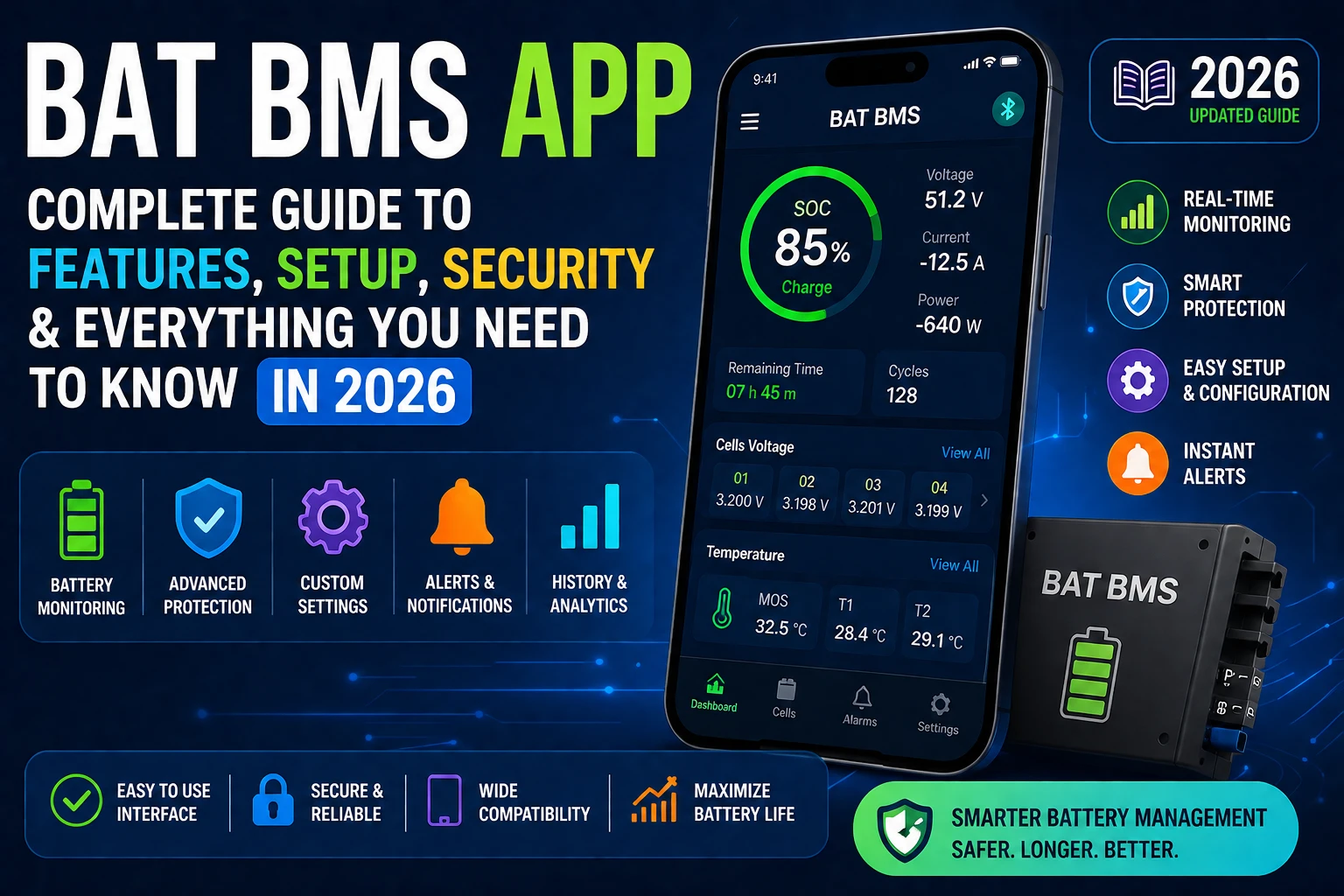
The BAT BMS app features include: no need for a separate battery monitor; wirelessly connecting to each battery from your phone; tracking cycle life on each battery; displaying SOC, voltage, charge and discharge current, cycle life, cell voltage, and temperature.
Here is a deeper breakdown of what each feature means in practice:
Real-Time Battery Dashboard
The main screen of the bat bms app displays the most critical data at a glance:
- SOC (State of Charge) — displayed as a percentage, this tells you exactly how much usable energy remains in your battery pack
- Pack Voltage (V) — the total voltage across the entire battery pack
- Current (A) — shows whether the battery is charging (positive current) or discharging (negative current) and at what rate
- Power (W) — calculated automatically from voltage and current, giving you real-time watt consumption or generation
- Remaining Capacity (Ah) — the exact amp-hours left before the battery hits its low-voltage cutoff
Individual Cell Voltage Monitoring
One of the most valuable tools in the bat bms app is the ability to view the voltage of every individual cell within the battery pack. A healthy lithium battery pack should have all cells within a very narrow voltage window of one another. Monitoring these values regularly helps you spot issues early. For example, if one cell voltage is much lower than others, it may be failing and needs attention.
This feature is especially useful for users who run battery packs in series or parallel configurations, as it helps identify a weak link before it causes a larger failure.
Temperature Tracking
Temperature tracking lets you monitor battery temperature to prevent overheating during charging or heavy use. LiFePO4 batteries are sensitive to both high heat and low temperatures. Many Bluetooth batteries include a low-temperature charging cutoff that automatically halts charging when temperatures drop below freezing — the app lets you monitor this in real time.
Cycle Life Counter
Every lithium battery is rated for a certain number of charge/discharge cycles before its capacity degrades significantly. The cycle count shows the number of full charge/discharge cycles. Most lithium batteries last 500–2,000 cycles depending on quality. Keeping an eye on this figure helps you plan for battery replacement before a failure occurs rather than after.
AutoBalance Function
This feature automatically equalizes cell voltages during charging or idle time. To enable it, go to the settings menu and toggle “AutoBalance” on. The app will then balance cells when the voltage difference exceeds a threshold, usually 0.02V. This prolongs battery life and prevents overcharging of individual cells.
Cell balancing is one of the most important maintenance functions for a lithium battery pack. An imbalanced pack loses usable capacity over time and, in extreme cases, can develop safety risks. AutoBalance largely automates what would otherwise require manual intervention with dedicated hardware.
Charge and Discharge Switch Control
You can remotely enable or disable charging or discharging. This is useful when storing the battery for long periods — disable both to prevent parasitic drain.
This feature is legitimate and useful for battery owners — it is also the feature that became the centre of the controversy when individuals began using it without authorization on unsecured batteries belonging to others.
Multi-Battery Management
The app can connect to multiple batteries at a time, and the data of another battery can be viewed by switching between left and right pages. This is particularly useful for users running battery banks made up of multiple units, such as those building large off-grid solar systems or dual-battery marine setups.
How to Download and Set Up the BAT BMS App
System Requirements
Before downloading, confirm your device meets these minimum specifications:
- Android — Android 5.0 or later, Bluetooth 5.0 with BLE support
- iOS — iOS 12.0 or later, Bluetooth 5.0 with BLE support
- Operating distance — stable connection within 15 metres (approximately 50 feet) in open space; range may be reduced by walls, metal enclosures, or interference
Step-by-Step Setup
Step 1 — Download the app. Search for “BAT-BMS” in the Google Play Store (published under Shenzhen Grenergy Technology) or the Apple App Store. The app is completely free and carries no in-app purchases.
Step 2 — Enable Bluetooth on your phone. Ensure Bluetooth is switched on and that your phone is within range of the battery you want to connect to.
Step 3 — Grant permissions. On first launch, grant the app the location and Bluetooth permissions it requests. These are required by Android and iOS to perform BLE device scanning — the app does not track your physical location. The developer does not collect any data from this app.
Step 4 — Connect to your battery. The app will automatically scan for nearby compatible batteries. Tap on your battery’s name in the device list to initiate a connection.
Step 5 — Begin monitoring. Once connected, the main dashboard populates with live data. Swipe left or right to switch between multiple batteries if you have more than one connected.
Important note: If you want to connect this battery with another mobile phone, please exit the app program from the first mobile phone. The BMS hardware only supports one active Bluetooth master connection at a time.
Advanced Settings and Tips for the BAT BMS App
Using AutoBalance Effectively
AutoBalance works best when triggered during a full charge cycle. For most users with moderate usage patterns, enabling AutoBalance once a month is sufficient to keep cells in good health. Users with heavy daily cycling — such as commercial solar installations or high-use RV setups — may benefit from more frequent balancing. Monitor the cell voltage spread shown in the app; if any cells are consistently diverging by more than 0.05V from the pack average, increase balancing frequency.
Managing Battery Storage
When storing a lithium battery for an extended period, use the app to disable both the charge and discharge switches. This prevents parasitic current draw from keeping the battery in an active state, which can lead to gradual over-discharge during long storage. The ideal storage SOC for LiFePO4 batteries is around 50–60%, and the storage environment should be cool and dry.
Using the App With Solar Systems
Indirectly, you can disable the charge MOS to stop charging from your solar controller. However, the app does not directly communicate with solar equipment. Use it as a monitoring tool to decide when to enable or disable charging. This is particularly useful for RV owners who want to prevent overcharging from a solar array during extended periods of low power consumption.
Monitoring Multiple Batteries in Series or Parallel
For users running battery banks in series or parallel, the app’s per-cell voltage monitoring becomes even more important. A single weak cell in a series bank can drag down the entire system’s performance and trigger premature low-voltage cutoffs. Use the individual cell voltage view in the bat bms app after each charge cycle to identify any outliers early.
The BAT BMS App Controversy — What Happened in India?
In late June and early July 2026, the bat bms app went viral across India for all the wrong reasons. Videos showing people remotely switching off moving e-rickshaws using an app called BAT-BMS flooded Instagram and other social media platforms. The trend, popularly dubbed the “Tirri Challenge”, prompted the Indian government to order the removal of BAT-BMS and another similar app, Epoch Li-ion, from app stores over safety concerns.
How Did It Work?
BAT-BMS was not designed as a hacking tool. It is a Battery Management System companion application developed for lithium-ion battery packs used in electric vehicles, including e-rickshaws. Battery manufacturers typically ship such apps to dealers, technicians, and vehicle owners so they can monitor battery health, check voltage and temperature, view charging status, diagnose faults, and update battery settings.
The vulnerability was not in the app itself — it was in the batteries. The app did not control vehicles over the internet. Instead, it communicated locally using Bluetooth, meaning the attacker had to be within wireless range, typically a few metres to a few dozen metres depending on the battery hardware and phone. That explains why many viral videos showed pranksters standing near traffic signals or roadside junctions before the e-rickshaw suddenly lost power.
Most budget e-rickshaws in India use Chinese-manufactured lithium battery packs with built-in BMS. These BMS units are designed for cost efficiency, not security: no password requirement — Bluetooth is open by default, and no PIN is set during manufacturing; no encryption — communication between app and BMS is plaintext; no access control — once connected, all features including discharge control are available; and default pairing mode — the BMS continuously broadcasts its presence, making it discoverable.
Who Was Affected?
Not every e-rickshaw was vulnerable. The issue depended on the battery pack installed in the vehicle. Only battery systems using compatible BMS hardware with exposed Bluetooth management interfaces could be controlled using BAT-BMS or similar applications. Battery packs that required secure authentication or had Bluetooth disabled were generally unaffected.
Passenger cars, including models from established manufacturers like Tata Motors, were confirmed to be unaffected by the vulnerability.
Government Action
The Central government directed the removal of the BAT-BMS app from the Google Play Store and Apple App Store after videos circulating on social media claimed it was being misused to remotely disable battery-powered e-rickshaws. The action follows complaints from drivers across several states, an investigation ordered by the Delhi government, and growing concerns over the security of Bluetooth-enabled battery management systems used in many electric three-wheelers.
MeitY Secretary S Krishnan confirmed: “There are a couple of apps which came up to our notice. Both of them have been taken down from the app stores,” adding that app stores must exercise greater due diligence to prevent potentially harmful applications from reaching users.
Real-World Impact on Drivers
The consequences were far from a harmless prank. Suddenly disabling an e-rickshaw in moving traffic can increase the risk of rear-end collisions, leave passengers stranded in unsafe locations, disrupt traffic flow, and damage livelihoods by preventing drivers from completing trips. Reports circulated of drivers being forced to manually push their vehicles to the roadside after losing power, sometimes losing an entire day’s earnings in the process.
The Broader Cybersecurity Problem the BAT BMS App Exposed
The bat bms app saga is not simply a story about a single application — it is a symptom of a systemic issue in the connected EV ecosystem. The BAT-BMS controversy highlights a much larger issue affecting connected vehicles. Modern electric vehicles increasingly rely on software-controlled battery management systems that communicate with smartphones via Bluetooth or Wi-Fi. Cybersecurity researchers have repeatedly shown that poorly secured battery management systems can become attack surfaces if manufacturers fail to implement strong authentication, encrypted communications, and restricted administrative access.
Many e-rickshaws and electric two-wheelers sold in India use battery management systems that are shipped without password protection or continue to operate with factory-default credentials. This is a manufacturing and supply chain problem that banning one app cannot solve.
Industry experts pointed out that the only durable fix lies with BMS manufacturers implementing the same security standards that other connected hardware industries have long adopted: mandatory password setup during first use, encrypted Bluetooth communication, and role-based access control that separates monitoring permissions from operational control permissions.
How to Protect Your Battery System From Unauthorized Access
If you own a lithium battery with a Bluetooth-enabled BMS, the following steps can significantly reduce your risk of unauthorized access through the bat bms app or any similar tool.
Set a Strong Password on Your BMS
Many BMS firmware versions support password protection, but it is often not enabled by default. The BAT BMS app itself may allow you to set a password under device settings. If your BMS supports this, set a strong password immediately. Avoid using factory defaults such as “1234” or “admin,” which are the first combinations any attacker will try.
Disable Bluetooth When Not in Use
If your BMS hardware supports disabling its Bluetooth radio through configuration software, do so whenever you do not need remote monitoring. Once Bluetooth is off, no app can connect. For e-rickshaw and EV operators who do not actively use the monitoring features during operation, this is the simplest and most effective protection.
Change the Bluetooth Broadcast Name
If supported by your specific firmware variant, change the Bluetooth broadcast name from generic tags like GRENERGY-BMS to a customized, discrete identifier. This prevents your battery from drawing attention during public scans. A battery broadcasting a generic manufacturer name is easy to identify as a target; a custom name is far less conspicuous.
Check Whether Your Battery Is Exposed
Download the BAT BMS app on your phone and walk near your parked vehicle. If the app discovers your battery and connects without a password prompt, your BMS is unsecured. This simple test takes under a minute and immediately tells you whether you need to take action.
Keep Only One Paired Device Active
Because the BMS only allows one active Bluetooth connection at a time, an attacker cannot connect to your battery if your own phone is already connected. For high-risk environments — such as vehicles parked in busy public areas — keeping the app running in the background on your personal device acts as a basic occupancy lock on the Bluetooth connection.
BAT BMS App Compatible Batteries and Brands
The bat bms app works specifically with Smart Bluetooth lithium batteries built on Grenergy’s BMS platform. Confirmed compatible brands and product lines include:
Enjoybot — One of the most widely distributed compatible brands in North America. Enjoybot’s full range of LiFePO4 batteries, including 12V, 24V, 36V, and 48V models for RV, marine, golf cart, and solar applications, all officially recommend the BAT BMS app. You can browse their Bluetooth-enabled product line at the Enjoybot Official Store.
Other Grenergy-based manufacturers — A range of Chinese battery manufacturers use Grenergy’s BMS hardware under their own branding. If your battery’s packaging mentions Bluetooth monitoring and directs you to search for a BMS app, it is worth testing the BAT BMS app first to see if it detects your device.
E-rickshaw battery packs — A significant portion of budget lithium battery packs used in electric three-wheelers across India, Bangladesh, and other South Asian markets use Grenergy-compatible BMS modules.
To check compatibility before downloading, look for the following on your battery’s packaging or manual: Bluetooth 5.0 BLE connectivity, BMS monitoring via smartphone app, or any reference to “BAT-BMS” or “Grenergy” by name.
Common Troubleshooting Issues and Solutions
App Cannot Detect the Battery
- Confirm Bluetooth is switched on and BLE is supported on your device
- Ensure you are within 15 metres of the battery
- Check that no other phone is currently connected to the battery — if so, exit the app on that device first
- Restart the battery system if possible, as some BMS modules require a power cycle to broadcast their Bluetooth signal
App Connects but Shows No Data
- Fully close and reopen the app
- Check that all required permissions (Bluetooth and Location) are granted in your phone’s settings
- Try moving closer to the battery to rule out a weak signal
SOC Percentage Appears Inaccurate
This usually indicates a calibration issue. Try a full charge followed by a full discharge to reset the BMS. Most BMS modules calibrate their SOC calculation by observing a complete charge and discharge cycle.
Cell Voltages Look Imbalanced
Enable AutoBalance from the settings menu and perform a full charge cycle. If one cell consistently shows a voltage significantly lower than the rest — below 2.5V for LiFePO4 — the cell may be degraded and the battery should be assessed by a qualified technician or replaced.
App Crashes on Android
This is a known issue reported by some users. Workarounds include clearing the app’s cache in Android settings, ensuring the app is updated to the latest version, and checking whether your device manufacturer restricts background Bluetooth activity to save battery.
BAT BMS App vs. Other Battery Monitoring Options
While the bat bms app is the official and most direct tool for Grenergy-based batteries, it is worth understanding how it compares to other options available to battery owners.
Dedicated hardware monitors — Physical shunt-based monitors such as the Victron BMV series or the Renogy battery monitor provide similar data without relying on Bluetooth connectivity. They are more reliable in terms of security and signal consistency, but require physical installation and lack the convenience of a smartphone interface. For users prioritizing security over convenience, a dedicated hardware monitor is worth considering alongside or instead of the app.
Proprietary manufacturer apps — Some premium battery brands develop their own companion apps with more polished interfaces and tighter security controls. These are generally more secure than generic Grenergy-based tools but only compatible with that manufacturer’s hardware.
MPPT solar controller apps — Solar charge controllers from brands like Victron Energy, Renogy, and EPever offer their own apps that provide battery data from the controller’s perspective. These complement rather than replace a BMS app like BAT BMS.
For users with compatible batteries, the bat bms app remains the most feature-complete and cost-effective option — it is free, requires no additional hardware, and provides direct access to BMS-level data that no external monitor can match.
Frequently Asked Questions About the BAT BMS App
Is the BAT BMS app free? Yes. The BAT BMS app is completely free to use. There are no subscription fees, in-app purchases, or paid tiers.
Does the BAT BMS app collect personal data? The developer does not collect any data from this app. It operates entirely over a local Bluetooth connection and does not require an internet connection for core monitoring functions.
Can I use the BAT BMS app without Wi-Fi or mobile data? Yes, the app works entirely over Bluetooth and does not require an internet connection for monitoring. However, firmware updates and some support features may need internet access.
How many batteries can I monitor at once? The app supports connecting to multiple batteries simultaneously. You can swipe left or right on the screen to switch between connected devices. The exact number depends on your phone’s Bluetooth capability, but typically 4–6 batteries work well.
Is the BAT BMS app still available to download? As of early July 2026, the app has been removed from app stores in India following the Indian government’s directive. It remains available in other regions. Users in affected regions can check the official website at batbms.online for the latest download information.
My BMS does not have a password — how do I set one? Open the BAT BMS app, connect to your battery, and navigate to the settings or configuration menu. If your BMS firmware supports it, there will be a password setup option. If none is available, contact your battery manufacturer for firmware update options or BMS replacement guidance.
Can the app control my solar charge controller? Not directly. The app communicates only with the BMS inside your battery. However, by monitoring your battery’s charge level and toggling the charge switch, you can indirectly interrupt charging from a solar controller.
Final Thoughts: The BAT BMS App in 2026
The bat bms app is a genuinely useful tool that became the centre of a significant public safety controversy — not because the app itself is malicious, but because it exposed a deep and systemic vulnerability in the security of Bluetooth-enabled battery management systems across India’s electric vehicle industry.
For legitimate users — solar installers, RV enthusiasts, marine battery owners, and EV technicians — the bat bms app remains a valuable piece of software that provides real-time, granular battery data without the cost or complexity of dedicated hardware monitors. Used responsibly and on batteries with properly secured BMS hardware, it delivers exactly what it was designed to deliver.
The lesson of 2026 is not that battery monitoring apps are dangerous. The lesson is that connected hardware — especially hardware installed in public-use vehicles — must be secured by design, not left open by default. Manufacturers, importers, and regulators all share responsibility for ensuring that the batteries powering India’s electric mobility revolution are as secure as they are capable.
For the latest updates on app availability, compatible battery brands, and security best practices, visit the official BAT BMS website and the Google Play listing for the most current version information.
Always use the BAT BMS app only on batteries you own or are authorized to manage. Unauthorized access to another person’s battery management system is illegal and poses serious risks to public safety.